
One-Boat Network
Johnson OutdoorsSports
2.5152.00 Reviews
- Version
- 5.080
- Installs
- 100.00K
- Age Rating
- Everyone
Screenshots
Our Review of One-Boat Network
 Analysis by Appyee
I approach One-Boat Network as a companion for anglers who already use compatible Humminbird or Minn Kota equipment, rather than as a fishing app that can replace a chartplotter or fish finder on its own. Its usefulness depends on the connection between a phone and the boat’s equipment, so the best experience is likely to come when you plan around that relationship instead of expecting the app to do everything independently. I’d consider it most seriously if I wanted my mobile device to play a more connected role in managing a fishing trip.
Where a connected setup earns its place
The practical appeal is less about adding another screen for its own sake and more about bringing a phone into an existing boating setup. If I were preparing for a trip, I’d first make sure the boat’s equipment and the app were ready to work together before leaving the dock. That small bit of preparation matters: the middle of a fishing session is a poor time to learn whether the phone, boat system, and intended connection are cooperating.
For an angler who already relies on compatible gear, keeping a mobile device involved can make it easier to check the app as part of the broader routine on board. I would treat it as a companion to the equipment, not as a reason to leave dedicated marine hardware behind. A phone is convenient to carry and familiar to use, but a boat’s installed equipment remains the more natural center of a setup built around marine electronics.
There is also a useful distinction between wanting a connected boating workflow and simply wanting fishing information. If all I needed were general reference material or a way to record a personal fishing log, a separate app designed for those specific tasks could be a simpler choice. This one makes more sense when its connection to Humminbird and Minn Kota equipment is relevant to the way I actually use my boat.
A sensible routine before leaving the dock
In an everyday scenario, I might arrive at the boat, check that my phone has enough charge, open the app, and confirm that the equipment I intend to use is available to the setup. I would do that before unloading everything or heading out. If the connection needs attention, there is more time to troubleshoot while safely docked than when I’m already underway and trying to focus on water, weather, and other people aboard.
That routine is a practical tip, not a promise that every connection will behave identically. Boat configurations and devices differ, and I would avoid assuming that installing the app automatically makes every piece of equipment communicate with it. I’d check compatibility for my own setup and follow the device and equipment instructions, then test the arrangement in a low-pressure setting before depending on it during a trip.
I’d also decide in advance what I expect the phone to contribute. If it is there as an extra point of access, I can keep using the boat’s main controls as usual and treat the mobile connection as supplementary. If I expect the app to replace equipment or take over a task, I’d first verify that my actual setup supports that use. This simple distinction prevents a common frustration: confusing an app’s role in a network with a guarantee that every function is available on every boat.
Staying connected on the water
I see connectivity as the point of this app, but that also makes preparation part of using it well. Before heading out, I’d decide what I need the phone to do and check that the boat equipment and mobile setup are ready while I’m still docked. That gives me a calmer way to judge whether this connected approach fits my routine.
What the app is—and who it suits
Johnson Outdoors makes this free sports app, which is listed for Everyone and has attracted over 50,000 installs. It has a 2.1 average from around 200 ratings, a figure I’d take seriously as a warning to set expectations rather than as proof that it will fail for every user. The app is at version 5.070, and in-app purchases are listed at $24.99 per item. I’d check the purchase details before paying, especially if I only need the app for a particular trip or a limited part of my setup.
The strongest fit is an angler who owns or plans to use compatible Humminbird or Minn Kota equipment and is willing to spend a little time getting the connection right. It is a weaker fit for someone who has no equipment from those brands, expects a phone-only fishing solution, or mainly wants a simple way to save notes about catches. For those needs, a conventional fishing log or a standalone navigation tool may be less dependent on a boat-specific setup and easier to adopt.
Compared with the usual alternatives in fishing and boating, the distinction is its equipment-centered purpose. A general fishing app can be useful without any marine electronics, while a standalone chartplotter or fish finder is designed to serve directly on the boat. This app sits closer to the connection layer between a phone and compatible equipment. That can be valuable if I already own the right gear, but it is a real limitation if I do not: the app’s appeal is not universal just because it is available to download.
Network-dependent moments and recovery
Connectivity changes the experience most when I want the phone to work as part of the boat’s system. The app should be judged by whether it fits that connected routine, not by whether it behaves like a fully independent marine device. I would avoid making assumptions about what remains available when a connection is interrupted. Before relying on any app-mediated information on the water, I’d learn what the connected equipment itself can do and keep using its intended controls and safety procedures.
If the app does not connect as expected, I’d work through the problem in a calm order: check that the phone and relevant boat equipment are powered, confirm I’m using the intended setup, and retry while still at the dock. I would not repeatedly change settings while underway or let troubleshooting distract from navigation. If a connection is unreliable on a given outing, the sensible fallback is to use the boat equipment according to its normal operation rather than treating the phone as essential.
This is one reason I see the app as an addition, not a single point of failure. A phone can lose charge, become inconvenient to handle, or simply be a less suitable screen in bright or wet conditions. Keeping it charged and secured, and knowing how to operate the boat’s equipment without depending on the app, are practical habits. They matter more than expecting a smooth connection every time.
Mobile use, battery, and data-conscious habits
A phone is handy because it is already familiar, but the water is a demanding place to use one. I’d keep it somewhere secure and easy to reach without balancing it near the edge of the boat. I’d also conserve battery by closing unrelated apps and bringing a suitable power source. The original appeal of having a mobile companion quickly disappears if the phone runs low while I’m still relying on it for other parts of the day.
For data-conscious use, I’d distinguish between the phone’s connection to boat equipment and any use of mobile internet. Those are not automatically the same thing. I would check my device settings and the app’s behavior before a trip if data use matters to me, and avoid assuming that every connected feature works through the same kind of connection. This is especially worthwhile for anglers who travel to areas with patchy mobile coverage or have a limited data plan.
I’d also avoid treating an app display as a substitute for paying attention to conditions around the boat. A digital aid is most useful when it supports good decisions, not when it pulls attention away from the water or other people aboard. If I’m operating the boat, I’d make setup checks before moving and keep hands-on navigation and safety ahead of phone interaction.
Setting Sail with One-Boat Network
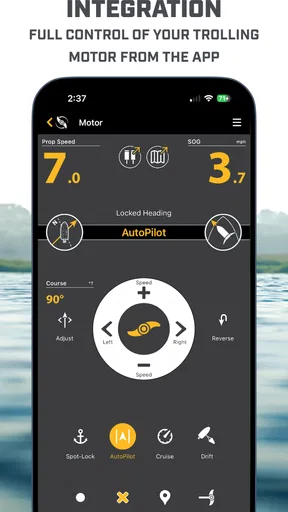
First off, getting started with the One-Boat Network app is a breeze. Downloading it from the App Store or Google Play is straightforward, and once you’ve installed it, you'll be greeted by a slick interface that's as inviting as a calm lake at dawn. The app is designed to sync seamlessly with your boat’s tech, bringing your sonar, GPS, and autopilot into one cohesive system. It’s like the command center of your dreams.
Features That Hook You In
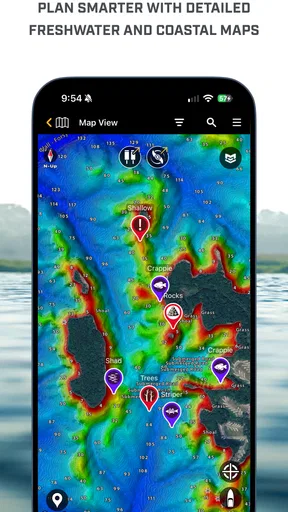
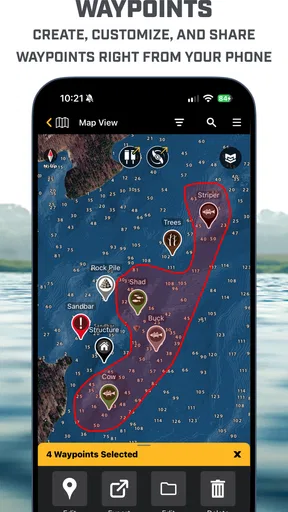
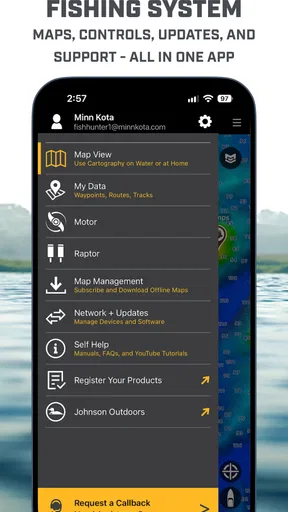
This app is packed with features, but a few really stand out. For starters, the GPS mapping is top-notch. You can chart your course, mark your favorite fishing spots, and even get alerts about underwater hazards. The real-time weather updates are a lifesaver too—no more getting caught in an unexpected squall!
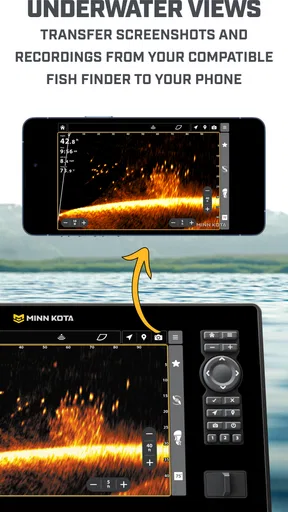
One of my favorite features is the fish finder. You can see exactly what’s happening beneath your boat with crystal-clear imaging. It’s almost like having x-ray vision for the water. And if you’re into social fishing, you can share your catches and spots with friends directly through the app. It’s a community builder for sure.
Sailing Smooth or Rough Waters?
Now, no app is perfect, right? While I found the One-Boat Network app to be mostly smooth sailing, there were a few minor hiccups. The initial sync with my boat’s system took a bit longer than expected. Patience is key here, but once it’s set up, it runs like a dream.
Another thing to consider is the battery life on your device. With all the features running, it can be a drain, so make sure you’ve got a good power source on board. But honestly, these are small trade-offs for the wealth of information and control you gain.
Reeling It In
So, is the journey worth it? If you're serious about fishing or just love spending time on the water, the One-Boat Network app is a solid catch. It transforms your boating experience, making it safer, smarter, and way more fun.
In a nutshell, this app brings a whole new level of convenience and connectivity to your fishing adventures. Whether you're trying to land the big one or just enjoy a peaceful day on the lake, it’s got you covered. Happy fishing!
My connectivity verdict
I’d choose this app when I already have compatible equipment and want my phone to participate in that setup; I’d skip it if I’m looking for a self-contained fishing companion with no boat hardware involved. Before a trip, I’d confirm compatibility, test the connection at the dock, keep the phone charged, and know how I’ll operate the boat if the mobile link is unavailable. With those expectations, it can be a useful extra for the right angler, but the low average rating and equipment-specific focus make it worth approaching carefully rather than installing on faith.
Verdict
Strengths of One-Boat Network
- Seamless integration with marine electronics.
- Real-time updates for fishing hotspots.
- User-friendly interface for easy navigation.
- Customizable maps for personalized experience.
- Offline access to saved maps and data.
Limitations of One-Boat Network
- Limited compatibility with older devices.
- Requires subscription for premium features.
- Initial setup can be time-consuming.
- Occasional bugs affect app performance.
- High battery consumption during usage.
Similar Picks in This Category
View All
BeSoccer: Soccer Live Score
BeSoccer apps4.3

Cricbuzz - Live Cricket Scores
Cricbuzz.com3.7

NFL
NFL Enterprises LLC2.4

Da Fit
MO YOUNG LIMITED3.6

ESPN
Disney4.5

LiveScore: Live Sports Scores
LiveScore Limited4.5
Frequently Asked Questions
What is One-Boat Network and how does it enhance my boating experience?
One-Boat Network is a comprehensive app designed to integrate your marine electronics into a seamless experience. It connects your GPS, fish finder, and other devices, allowing for synchronized data and easier control. This enhances navigation, fishing accuracy, and overall boating efficiency, providing a smarter, more connected adventure on the water.
Is the One-Boat Network app compatible with all my devices?
The One-Boat Network app is compatible with a wide range of marine electronics, including popular brands like Humminbird, Minn Kota, and Cannon. However, it’s essential to check the specific compatibility requirements for your devices on the app's official website or within the app store description before downloading.
What features does One-Boat Network offer for fishing enthusiasts?
For fishing enthusiasts, One-Boat Network offers advanced features such as real-time mapping, depth contour maps, and fish locating capabilities. It also allows for waypoint marking and route tracking, which can significantly enhance your fishing strategy and success rate by providing detailed insights and easy navigation.
How user-friendly is the One-Boat Network app for beginners?
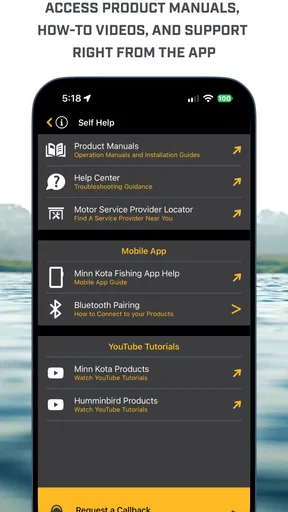
The One-Boat Network app is designed with a user-friendly interface that caters to both beginners and experienced boaters. It offers intuitive navigation, easy-to-understand tutorials, and customer support to help new users get accustomed to its features and functionalities without any hassle.
Are there any subscription fees or in-app purchases required?
While the One-Boat Network app may offer a free version with basic features, accessing premium functionalities or additional services might require a subscription or in-app purchases. It’s advisable to review the pricing details on the app store or the official website to understand the costs involved.
